



- Product Describe
-
Overview
The digital display viscometer is an upgraded and next-generation model of our company’s rotary viscometer. This instrument incorporates advanced mechanical design, state-of-the-art manufacturing processes, and microcomputer control technology, ensuring accurate data acquisition. It features a high-definition, full-color, high-brightness LCD display that provides clear and crisp data visualization.
This instrument features high measurement sensitivity, reliable test results, and minimal sample consumption, while also offering convenient operation and an elegant, sophisticated design. It is a precision instrument for measuring the absolute viscosity of Newtonian fluids and the apparent relative viscosity of non-Newtonian fluids, and is widely applicable to a broad range of chemical raw materials and products, including oils and fats, paints, plastics, pharmaceuticals, foodstuffs, coatings, adhesives, resins, solder pastes, red adhesives, asphalt, and more. The TV-2H series viscometers can also display shear rate and shear stress; viscosity readings are shown as continuous variations, with an audible alarm triggered when the measured value exceeds the instrument’s range; and the high-temperature furnace employs a ceramic-lined chamber for uniform heating, ensuring even temperature distribution and excellent thermal stability.
Main Technical Parameters
Model NDJ-1C RVT-2H HBT-2H Measurement range 5 to 1 million 50 to 10M 400–80M Rotor specifications One rotor each for numbers 21, 27, 28, and 29. Rotor speed 0.1–200 rpm, stepless speed regulation Sample volume (mL) 10–20 ml Test accuracy ±1% (Newtonian fluid) Repeatability ±0.2% (FS) Newtonian fluid Temperature measurement Standard across the entire lineup Viscosity-temperature curve The entire series can output viscosity-temperature-time curves. Temperature control range (°C) Room temperature +10 to 300 Temperature control accuracy (°C) ±0.1 Power supply 220V 50Hz Working principle of the instrument
This instrument is a digital viscometer that uses an electric motor with a speed-reducing mechanism to drive the rotor at a constant angular velocity. As the rotor rotates within the liquid, the liquid exerts a viscous torque on the rotor; the greater the viscosity, the larger the viscous torque, and conversely, the lower the viscosity, the smaller the viscous torque. This viscous torque acting on the rotor is detected by a sensor and, after processing by a computer, the viscosity of the liquid under test is determined.
This instrument employs microcomputer technology to allow convenient setting of the measurement range (rotor number and rotational speed), perform digital processing of sensor-detected data, and clearly display on the screen the set rotor number, rotational speed, shear rate, shear stress, viscosity value of the liquid being measured, the maximum measurable viscosity at the current rotational speed, and the corresponding full-scale percentage, among other parameters.

Figure 1
Instrument Structure and Installation
(1) Instrument Structure
(1) Level bubble on the viscometer head. (2) Color display screen.
(3) Connect the protective cap, (4) heating furnace.
(5) Main unit base. (6) Temperature control instrument.
(7) Horizontal adjustment knob for the host base.
Figure 2
(2) Installation of the Instrument
2.1. Inspect the power supply to ensure it meets the operating requirements of this instrument; in accordance with relevant national regulations, the instrument’s grounding terminal must be connected to a reliable grounding conductor.
2.2 The instrument shall be installed on a workbench that is free from corrosive gases, strong electromagnetic interference, and vibration.
2.3 Insert the toothed post into the circular hole on the main unit base, ensuring that the toothed surface on the post faces directly forward toward the base. Then, use a hex wrench to tighten the bolt on the post to prevent it from rotating (see Figure 2).
2.4 Rotate the lifting handwheel to adjust the vertical position. If the handwheel feels either too tight or too loose during rotation, adjust the tension screw located at the front of the lifting base; set it slightly tight to prevent the viscometer head from dropping under its own weight. Then insert the viscometer head handle into the circular mounting hole on the head to ensure the head is approximately horizontal, and secure it by tightening the fixing handwheel.

Figure 3
2.5 Loosen and remove the yellow protective cap beneath the viscometer head (see Figure 4).
2.6 Adjust the three leveling screws on the instrument base to center the spirit level bubble on the viscometer head.
(1) Height-adjustment and tension-adjustment screw (with hexagonal socket head)
(2) Lift-and-lower handwheel
(3) Head-fixing handwheel
(4) Column
(5) Column Fixing Bolts
(1) RS232 interface, printer interface
 (2) Crossbar Connector
 - Power switch
- Yellow protective cap
(6) Power cord socket
(7) Temperature sensor probe interface (not yet enabled on this unit) Not yet enabled on this unit
(8) Mounting holes for the protective frame
Figure 4
Operation and Use of the Instrument
5.1 Prepare the liquid to be tested and place it in a beaker or a cylindrical container with a diameter of at least 80 mm and a height of at least 125 mm.
5.2. Accurately control the temperature of the liquid being measured.
5.3 Carefully level the instrument, verify that the bubble in the spirit level is centered, and ensure the instrument is in a horizontally stable working condition (by installing the protective bracket).
5.4 Select the appropriate rotor and screw it into the rotor connector (screw in counterclockwise to install, screw out clockwise to remove).
5.5 Slowly adjust the elevation knob to set the rotor’s immersion depth in the test liquid until the rotor’s liquid-level mark (the midpoint of the groove) is flush with the liquid surface.
5.6 Keyboard Operation and Display Interface Description:
Print
Output
Switching between printing and output functions
Restart the application and
Return
Pause
Stop the motor or cancel the task and put the host into standby mode. Confirm Start the motor; the main unit enters the operating (measurement) state. ▶ During measurement of the test item, viscosity curve, center setting, record query, rotor selection, speed setting, and time setting, the edit cursor moves to the right. ◀ When measuring parameters, viewing viscosity curves, setting the center, querying records, or adjusting rotor speed or time settings, the edit cursor moves to the left. ▲ Increase the number when selecting functions in the settings for speed, RPM, or time. ▼ Decrease the number when selecting functions in the settings for rotor, speed, or time. 5.7 Turn on the power switch on the back of the instrument to enter the standby mode; the display screen is shown in Figure 5. Press the ◀ or ▶ key to select a menu item, and after selecting the desired measurement function, press the OK key to enter the corresponding screen, as shown in Figure 6. When the cursor is positioned at R1#, press the ▲ or ▼ key to select the required rotor number.


 Figure 5 Figure 6 Figure 7
 5.8 Press the ◀ or ▶ key to switch to the rotational speed setting; the cursor will stop at the 0.5 rpm position shown in Figure 7. Use the ▲ or ▼ keys to select the desired rotational speed. After selecting the rotor and the speed setting, press the OK key; the rotor will begin to rotate, the instrument will start the measurement, and the screen will display as shown in Figure 8.

Figure 8
The display shows, in sequence: date, time, temperature, rotor number, rotational speed, measurement duration, viscosity, (shear rate and shear stress—these two parameters are displayed only when a specific measuring cup is used), and torque. Only torque readings within the 10%–90% range are considered valid; if the reading falls outside this range (below 10% or above 90%, indicated by a red bar below the percentage display), the system prompts the user to adjust the rotational speed or switch to a different rotor. The upper-right corner displays the maximum measurable range at the current rotor speed.
5.9. To set a timed measurement, return to the main menu, press the ◀ or ▶ key to switch to the Settings Center, and then press the OK key to enter the settings. Use the ▼ key to scroll down the menu, select “7. Timer On/Off,” and press OK to confirm. You can then use the ▲ or ▼ keys to toggle the timer on or off. Press the OK key to confirm the setting, and press OK again to exit. Return to the Measurement Items screen, select the rotor speed, and you can then set the timed measurement. (Note: If the set timer duration is shorter than the minimum measurement time, the system will automatically adjust it to the minimum.)
5.10 During measurement, press the Pause button to stop the instrument; pressing the Confirm button again will resume measurement using the rotor number, rotation speed, and timing duration set during the previous session. To change the rotor or rotation speed, you must first press the Return button before proceeding.
5.11. Return to the main menu screen as shown in Figure 5, select “Viscosity-Temperature Curve” with the cursor, and press the OK key to enter the viscosity-temperature curve measurement mode, as shown in Figure 9. The settings for rotor, rotation speed, and timing are the same as those used in the measurement items (cp represents viscosity, and T represents temperature).
5.12. To save the measurement results, press the Save key once the measured value has stabilized; a “Saving…” pop-up window will appear, indicating that the save operation was successful. To view the saved data, return to the main menu screen as shown in Figure 5, select “Query Records” with the cursor, and press the OK key to enter the query mode, as shown in Figure 10. In this mode, you can clearly view the rotor type, rotational speed, measured viscosity, and measurement time.


 5.13. Return to the main menu screen as shown in Figure 5, select “Set Neutral” with the cursor, and press the OK button to enter the settings center, as shown in Figure 11. This instrument supports dual-language switching (Chinese/English), six theme color options (blue/green/red/orange/purple/black), date and time settings, time display format settings (12-hour/24-hour), two speed-control modes (step-speed control/infinite-speed control), communication and printing mode selection (the communication/printing mode must be set in advance for accurate operation), and timer on/off settings.
 Figure 9 Figure 10 Figure 11
5.14, Parameters of the digital temperature controller electric furnace system: .
1. Accuracy: ±0.5% FS ± 1b
2. Output: SCR output up to 600 W
3. Power supply voltage: AC 220 V ±10%
4. Insulation: The power supply shall withstand 1500 V AC for 1 minute relative to the relay output.
Power supply to input, relay to input: 500 V AC for 1 minute
5. Implementation Standard: Q/SOFM1-2004
Instructions for use: 1. Follow the “Menu Instructions” procedure to switch to the menu you wish to modify when setting your own parameters.
2. Press SET; the ones digit of the parameter value will begin to flash.
3. According to the instructions, move the blinking cursor to the digit you wish to modify, then press the ↑ or ↓ key to change that digit to the desired number or symbol.
4. Repeat Step 3 until the four-digit number has been successfully modified.
5. Press SET to confirm; at this point, the parameter value will stop flashing, or the system will move on to the next menu item.
6. If you need to modify the memory parameters, repeat the above steps: press and hold the SET button until “SC” or “LCK On” appears, then press SET again to display “LCK”; next, press the up key, enter the password “6”, and press SET to unlock.
Parameter settings: LCK=0 means no lock; LCK=any other value means locked. Upper deviation alarm for AL1: –9.99 to 999.9; when PV exceeds SV plus AL1, an alarm is triggered and the instrument output is cut off.
SC probe value correction: PV = SV + SC –9.99 to 100.0. LCK key lock range: 0 to 255; if LCK is set to 6, the following menu will appear: ATU auto-tuning 0/1.
P: Proportional band, 0–1000.0% I: Integral time, 1–4320 seconds
T cycle 1–60 seconds
XL Slope PV = PV × XL 1.000
DF (Local Backup)
GC maximum output power suppression: 0.1 to 3.0; the larger the GC value, the stronger the power suppression effect. The default setting for this unit is 1.0.
OUT automatic power suppression On/Off, with control accuracy expressed as a percentage.
Note: Changes to each parameter must be confirmed by pressing SET or by waiting 5 seconds to exit and save. If the instrument automatically exits after 30 seconds, the menu changes may not have been saved. Modifications are only effective when the password LCK is set to 6.
(6). Precautions
6.1 To prevent rotor deformation, all rotors shall be stored in a vertical position and must not be subjected to lateral forces.
6.2 To prevent damage to the small shaft, the main unit must not be laid on its side or inverted (and when the rotor has not been removed, the main unit must never be placed arbitrarily).
6.3 To prevent significant rotor wobble during rotation, which could affect measurement accuracy, ensure that the shaft threads and the mating end face of the rotor are clean before installation.
6.4 When lifting or lowering the main unit, it shall be supported by hand at the same time to prevent the unit from falling due to looseness in the lifting mechanism.
6.5 After replacing the rotor, the new rotor number must be entered promptly. The removed rotor must be cleaned and dried immediately, then returned to the rotor rack. To prevent damage to the main unit, rotors that have not been removed must not be cleaned.
6.6 To avoid measurement errors caused by the presence of other liquids in the fluid being measured, the rotor and protective housing must be cleaned and dried thoroughly before switching to a different fluid.
6.7 The main unit and rotor are manufactured as a dedicated, matched pair; rotors intended for specific main units must not be mistakenly interchanged or used interchangeably.
6.8. All components inside the host unit must not be disassembled or adjusted.
6.9 To prevent damage to the host during handling or transportation, the spindle must be protected with a protective sleeve and placed in a dedicated instrument case.
6.10 To prevent damage to the components, the main unit must not be run idly for an extended period after the rotor has been installed.
6.11. Since most of the liquids being measured are non-Newtonian fluids, their viscosity values vary with shear rate, time, and other conditions. Therefore, it is normal for the viscosity readings to differ when the same non-Newtonian fluid is measured using different rotors, rotor speeds, and measurement times; this does not indicate an instrument malfunction. When measuring non-Newtonian fluids, the choice of rotor, rotor speed, and measurement time should be determined in accordance with the specific characteristics of the fluid.
VII. Several Methods for Reducing Measurement Error
7.1 Use a constant-temperature water bath to control the temperature of the liquid under test and ensure that each measurement is performed under the same temperature conditions.
7.2 Prior to measurement, ensure that the rotor and protection frame are thoroughly cleaned. When using rotors 1–4 or R1–R7 for measurement, the protection frame must be installed; otherwise, the accuracy of the measurement data will be compromised.
7.3 During measurement, the rotor shall be positioned at the center of the container, with the rotor’s liquid-level mark aligned with the liquid surface, and the main unit maintained in a horizontal position.
7.4. The rotor shall be immersed in the liquid under test and allowed to equilibrate for ten minutes to ensure thermal equilibrium before measurement is taken.
7.5 When switching from high-speed measurement to low-speed measurement, first press the button to stop the motor, then set the speed to low, and wait until the liquid surface has stabilized before pressing the button to start the measurement, in order to eliminate measurement errors caused by the liquid’s rotational inertia.
7.6 When measuring low-viscosity liquids, start with rotor No. 1; when measuring high-viscosity liquids, start with rotor No. 4. Subsequently, based on the displayed torque value, determine whether to switch rotors and adjust the rotational speed.
7.7 When measuring high-viscosity liquids at low speeds, the measurement time should be extended to allow the data to stabilize before reading the results.
7.8 During measurement, operations such as raising or lowering the instrument, changing the rotor, or replacing the test liquid may cause the instrument to lose its level; the level should be checked and re-adjusted promptly.
7.9 Regular or irregular calibration of the main instrument using standard viscosity fluids is required to assess and verify its performance and operating condition. (The appropriate standard viscosity fluid should be selected based on the commonly used viscosity measurement range.)
8.0 Temperature Controller:
PV: Actual measured value
SV: Set temperature value
Operating Steps
8.1 Ensure that the installation steps have been completed accurately;
8.2 After connecting the temperature controller to the power supply and turning on the switch, the SV display will show the temperature value set during the previous operation, while the PV display will rapidly increase until it reaches the temperature value set in the SV display.
8.3 When it is necessary to reset the temperature setpoint, press the <∧> key or the <∨> key to increase or decrease the value, thereby setting the desired operating temperature. The PV display will then rapidly approach the setpoint specified in the SV display. If the new setpoint is lower than the original temperature, the PV display will change more slowly; once the reading stabilizes, the system will operate normally.
How to Determine the Viscosity Range of an Unknown Liquid (Sample)
When measuring liquids (samples) with an unknown viscosity range, selecting the appropriate rotor and rotational speed is a common challenge for operators. In such cases, measurements should be conducted in accordance with the following principles and methods:
9.1. Strictly adhere to the basic operating principle: for high-viscosity samples, use small-volume rotors (Nos. 3 and 4) and low rotational speeds; for low-viscosity samples, use large-volume rotors (Nos. 1 and 2) and high rotational speeds.
9.2 If the viscosity range of the liquid being measured (the sample) can be estimated, first select an appropriate rotor and then choose a rotation speed starting from low and gradually increasing. In this case, the maximum measurable range displayed on the LCD screen will decrease as the speed increases (for example, when using rotor No. 1, the maximum range is 1000 mPa·s at 6 rpm, but decreases to 100 mPa·s at 60 rpm—a tenfold reduction in range).
9.3 When the viscosity of the liquid being measured (the sample) cannot be estimated, first try using rotors ranging from small to large volumes and select rotational speeds from low to high.
9.4. The torque value displayed during measurement can be used to determine whether the selected rotor and rotational speed are appropriate. Measurement values within the 10%–90% range of full scale are considered valid; if the value falls outside this range (i.e., below 10% or above 90%, indicated by a red alarm on the lower percentage bar), the operator should adjust the rotational speed or change the rotor, as failure to do so will result in significant measurement error.
Common Viscosity Unit Conversions
1 centipoise (1 cp) = 1 millipascal-second (1 mPa·s); 100 centipoises (100 cp) = 1 poise (1 p).
1000 millipascal-seconds (1000 mPa·s) = 1 pascal-second (1 Pa·s); 10 dPa·s = 1 Pa·s.
1 Pa·s = 1000 cP = 1000 mPa·s = 10 P = 10 dPa·s
Conversion between dynamic viscosity and kinematic viscosity:
η = ν·ρ
η— Dynamic viscosity of the sample (mPa·s)
ν— Kinematic viscosity of the sample (mm²/s)
ρ— Density of the sample at the same temperature as the kinematic viscosity measurement (g/cm³)
For liquids, higher pressure corresponds to lower temperature and higher viscosity, while lower pressure corresponds to higher temperature and lower viscosity.
For gases, pressure has little effect. Viscosity increases with temperature and decreases with lower temperatures.
Viscosity is measured in two units: pascal-seconds and poise.
1 poise = 1 g/(cm·s) = 0.1 Pa·s
Poise: a unit of viscosity in the centimeter–gram–second system, named in honor of the French scientist Jean Louis Poiseuille (1799–1869).
Liquid level height and rotor structure and material usage


Simple Troubleshooting
Fault phenomenon Possible causes The bubble level cannot be centered. The workbench has a large tilt angle. Host head shaking The crossbar connection was not tightened with a wrench. Inaccurate data when measuring Newtonian fluids Protection frame not installed The rotor being used does not match the rotor number displayed on the screen. The machine is not leveled, or its level has been disturbed due to other operations. The sample did not immerse to the rotor’s liquid-level mark. The rotor is not installed correctly. The rotor was not cleaned in a timely manner after the previous measurement. The rotor and the main unit are incompatible. The sample temperature varies during the measurement. Aging or damage to host mechanical components Temperature is not displayed on the screen. The selected model is not equipped with an RTD temperature probe. Abnormal temperature display on the screen
RTD temperature probe damaged Poor contact at the plug connector between the RTD temperature probe and the host unit. Automatically stops during measurement The timer function has been set to measure the time. The data keeps changing during measurement. The sample tested is a non-Newtonian fluid. The sample temperature varies during the measurement. Aging or damage to host mechanical components XIII. Packing List
Serial Number Name Quantity Standard configuration Optional items 1 Host 1 unit ✔ 2 Rotors No. 21, 27, 28, and 29 1 set ✔ 3 Power adapter 1 set ✔ 4 Base 1 item ✔ 5 Lifting column 1 set ✔ 6 RTD temperature probe 1 item Improved type: none 9 Crossbar 1 root ✔ 10 Hex key 1 item ✔ 11 Fixed wrench 1 item ✔ 12 Heating furnace 1 item ✔ 13 Temperature controller 1 unit ✔ 14 Dedicated Hopper Card 1 piece ✔ 15 Connect the cable 1 root ✔ 16 Connect the hook 1 item ✔ 17 Graduated cylinder 1 item ✔ 18 Positioning frame 1 item ✔ 29 Certificate of Conformity and Warranty Card 1 set ✔ 20 Instruction Manual 1 copy ✔ Packer Date


Company Profile
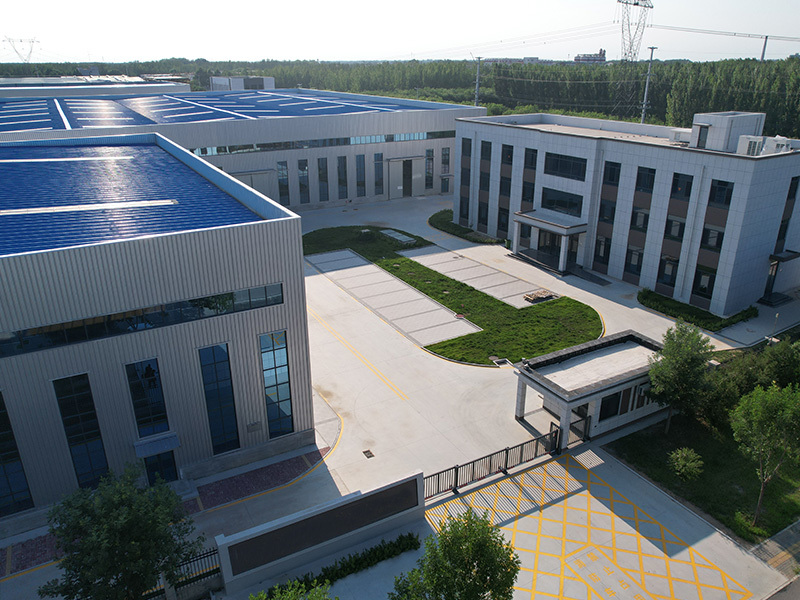
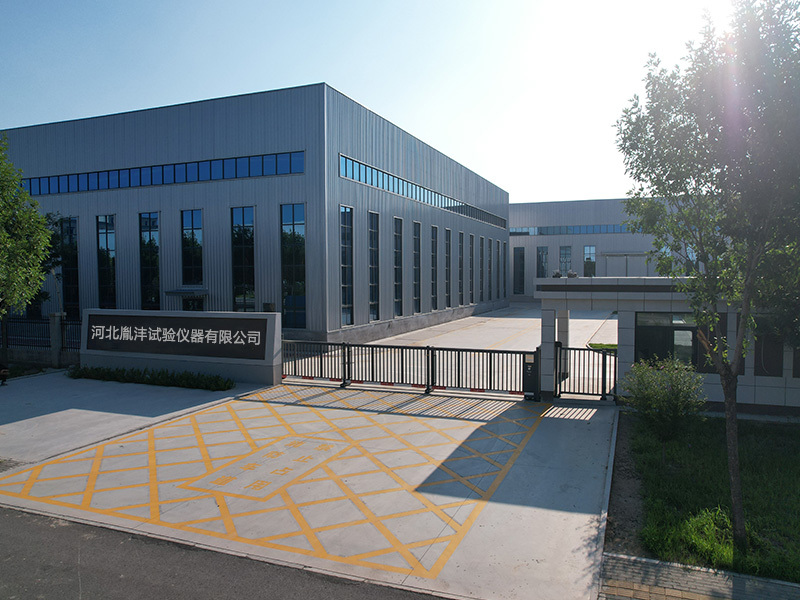
Hebei Yinfeng Experimental Instrument Co., Ltd. is a high-tech enterprise dedicated to the research and development, production, and sales of experimental instruments. The company is headquartered in Hebei Province, relying on the strong industrial foundation and technological innovation resources in the Beijing Tianjin Hebei region. It is committed to providing high-precision and high reliability testing equipment and solutions for material testing, engineering quality control, scientific research experiments and other fields.


Customized Delivery Process
We provide customers with full-process services ranging from pre-sale consultation, customized solution design, equipment installation and commissioning to after-sale technical support.
Online Communication
Provide Custom Drawings
Merchant Quotation
Sign A Contract
Processing And Production
Packaging And Distribution
Confirm Receipt Of Goods
Successful Transaction
Previous:
Asphalt Brookfield Rotational Viscometer
If you need customized products, Contact US !
Share to


Tag list
Request a Quote
We will contact you within one working day. Please pay attention to your email.
Related Products
Content update in progress
Message
We will contact you within one business day. Please note your email address.
Fast navigation
Contact Us
Whatsapp/Tel: +86-15931715356,+86 16631790555
E-mail: qcj@cnhblabequipment.com
Add: Chengnan Industrial Zone, Xian County, Cangzhou City, Hebei Province

Online Message